Writing and Importing a Resume
Create or import a resume on Web, edit it module by module, switch template themes, manage multiple versions, and export to PDF.
AI Resume is Kuaimian's Web feature, free to use throughout with no version limits. You can upload an old resume for the AI to parse automatically, or start fresh from a template, then refine the content module by module, see the live draft on the right, and finally export to PDF in one click.
Create or import
After logging in, go to "Resume," where you have three starting points:
- Upload an old resume for automatic parsing: Upload an existing PDF / Word / txt resume (≤10MB, full-page drag-and-drop), and the AI automatically recognizes it and fills the content into each module in a structured way, saving you from re-entering everything.
- Generate a resume from one line: No existing resume? No problem — describe yourself in a single line, let the AI expand it into a full resume, then pick a template.
- Start fresh from a template: Prefer to fill it in from scratch? Pick a template to create a blank resume and just fill in your experience.
Structured editing, module by module
A resume is made of individual modules you can add, remove, and drag to reorder, with a clear structure:
| Module | Content |
|---|---|
| Basic info | Name, contact details, job objective, etc. |
| Summary | A paragraph of self-positioning / job-search summary |
| Education | School, major, degree, dates |
| Work experience | Company, title, responsibilities and results |
| Project experience | Project background, your role, deliverables |
| Skills | Tech stack, tools, capability list |
| Custom modules | Certifications, awards, portfolio, and other free-form content |
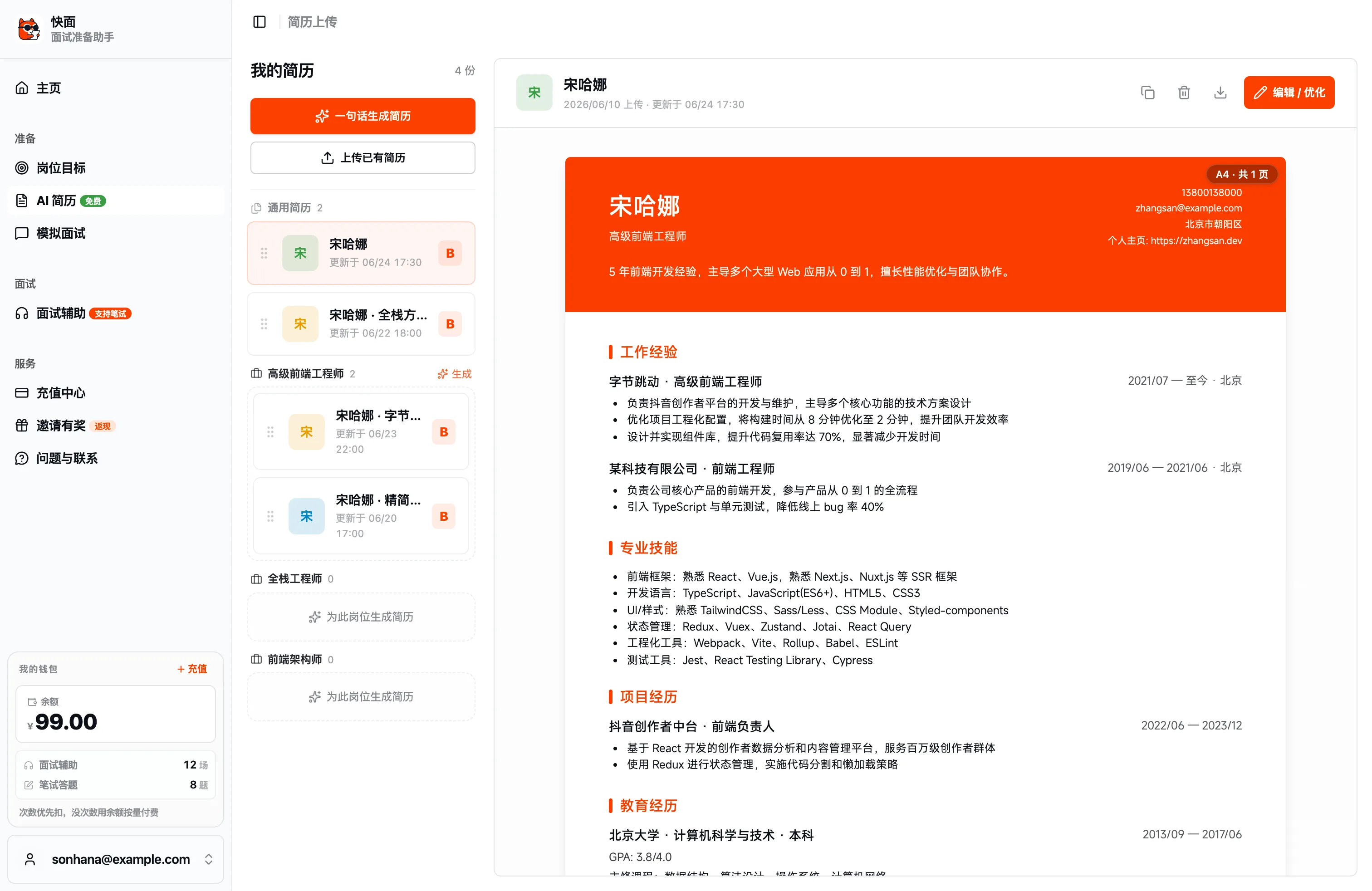
Fill in block by block on the left while the A4 canvas on the right renders the final layout live — WYSIWYG, so you know what you're getting before export. Module order is drag-adjustable, so your most competitive content sits up front.
Templates and themes
Kuaimian has several built-in resume templates you can switch between any time without losing content:
- Banner: A colored banner header that foregrounds the visual focus.
- Modern: Clean layout, good for internet / tech roles.
- Minimalist: Restrained white space, foregrounding the content itself.
- Elegant: Refined typography, good for design / content roles.
Beyond templates, theme color, font, font size, and line height are all adjustable in one click to find the look that suits this particular resume.
Managing multiple resumes
One base draft can spawn multiple versions that don't interfere with each other when applying to different companies — this is exactly the recommended way to use AI Resume: optimize a separate version for each target company. Resume management has both a general pool and position-based grouping; you can drag to reorder, move / copy resumes between positions, or "AI-optimize for this position" directly. Diagnosed resumes carry an A / B / C / D grade badge. All resumes can be renamed, copied, and deleted, and you can return to any one to keep editing at any time.
Export
Once the content is finalized, export in one click to apply — PDF / JPG (high-fidelity backend render) / Markdown / JSON / print are all supported. When applying to another company, switch the target job, optimize a new version, and export again.
Next steps
- Let the AI rewrite for the job and tailor to the JD: AI Optimization and JD Tailoring.
- Not sure which platform to use: Core Concepts.