AI Optimization and JD Tailoring
Polish in one click, rewrite with custom instructions, tailor section by section to the target JD, adopt changes via side-by-side diff, and fill in keywords to clear ATS screens reliably.
A good resume isn't written for every company — it's aligned to one target job. Kuaimian's AI optimization rewrites your experience section by section against the target JD, giving suggestions you can adopt one at a time — amplifying relevant items, filling in keywords, and turning "was responsible for" into statements with quantified results.
Haven't built your resume yet? Start with Writing and Importing a Resume.
Three optimization modes
In the editor, open "AI Optimization." There are three modes to choose from:
| Mode | Best for |
|---|---|
| Diagnose | Get a baseline first: score the resume and list improvement items, so you know what to fix |
| One-click polish | Polishing the overall phrasing — start right away, no thinking required; you can add a custom instruction |
| Job-targeted | Rewrite section by section against the target JD, moving toward the candidate this company wants |
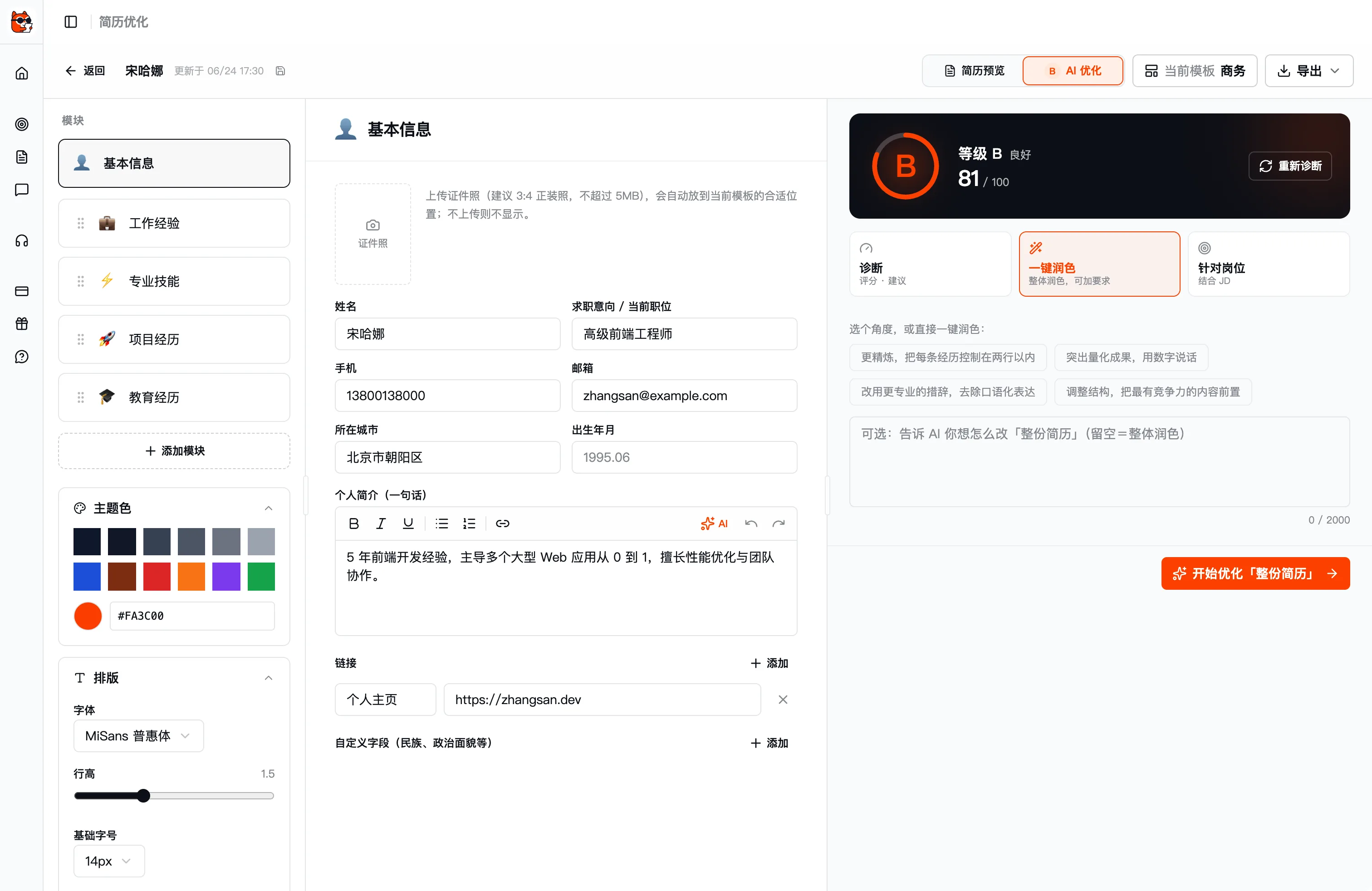
Diagnose: score first, then treat the symptoms
"Diagnose" scores your resume across five dimensions — completeness, quantified impact, clarity, job relevance, and formatting — and lists improvement issues one by one. Each issue jumps you to the spot (clicking "fill in / optimize" highlights the target), or you can simply ignore it. After diagnosis the resume also gets an A / B / C / D grade badge. The score is cached and marked "stale" the moment content changes, reminding you to re-diagnose.
Job tailoring (JD tailoring)
This is the core use of AI Resume. In "Job-targeted" mode, pick a target job and the AI rewrites your experience against that job's JD:
- Amplify relevant items: Move job-relevant experience to a prominent position and write it out more fully.
- Fill in keywords: Compare against the JD's high-frequency keywords, flag missing hard skills, and clear ATS screens more reliably.
- Adjust wording: Let HR see the match at a glance, rather than buried in long paragraphs.
One base draft can spawn multiple job-specific versions that don't interfere with each other — every target company is worth a separately optimized version.
Section-by-section comparison, you decide what to adopt
The AI won't rewrite or overwrite your text on its own. After optimization runs, it lists rewrite suggestions section by section across your resume's parts (basic info, skills, work experience, project experience, and so on), shown as a diff against the original:
Each suggestion is a card stating the reason for the optimization with a result preview, and you can, per item:
- Apply: Adopt this one if you're happy with it.
- Re-optimize: Have the AI rewrite it again if you're not.
- Discard: Skip it outright and keep the original.
You can also "apply all" by section, or choose Save as a copy — saving the optimized result as a new resume without touching the original. The whole process is fully under your control, and the final draft is always a version you've confirmed.
Field-level fine-tuning
Beyond whole-resume optimization, you can refine a single field: hover over a field, click the ✨ icon that appears, optionally type a custom instruction, and the AI changes just that one field — perfect for "I just want to polish this one line a bit more."
Keyword and ATS tips
Many companies use an ATS (resume screening system) for an initial machine pass, and mismatched keywords can get you filtered out outright. A few tips:
- Match the JD's wording: If the JD says "data analysis," don't write only "data processing" — align terminology as much as possible.
- List hard skills in full: For tools, frameworks, and certifications named in the JD, spell them out explicitly if you have them.
- Quantify first: Let numbers speak (e.g. "P99 down 42%") — this clears machine screens and wins over human ones.
- One version per job: Switch jobs, switch to a tailored version — don't blast the same resume at every company.
Once finalized, return to the editor and export to apply (PDF / JPG / Markdown / JSON / print supported).
Next steps
- Editing, templates, and multi-version management: Writing and Importing a Resume.
- Resume polished — go practice for interviews: Start a Mock Interview.