Real-time auto answers Works on every platform Fully stealth & anonymous Top model: Opus

Full-processAIinterview & coding-test copilot

AI hears the question and answers for you · the next Offer is yours

Claim your starter pack on sign-up — auto-credited, no payment needed

4.9
User rating
6k+
Interviews
18k+
Problems solved
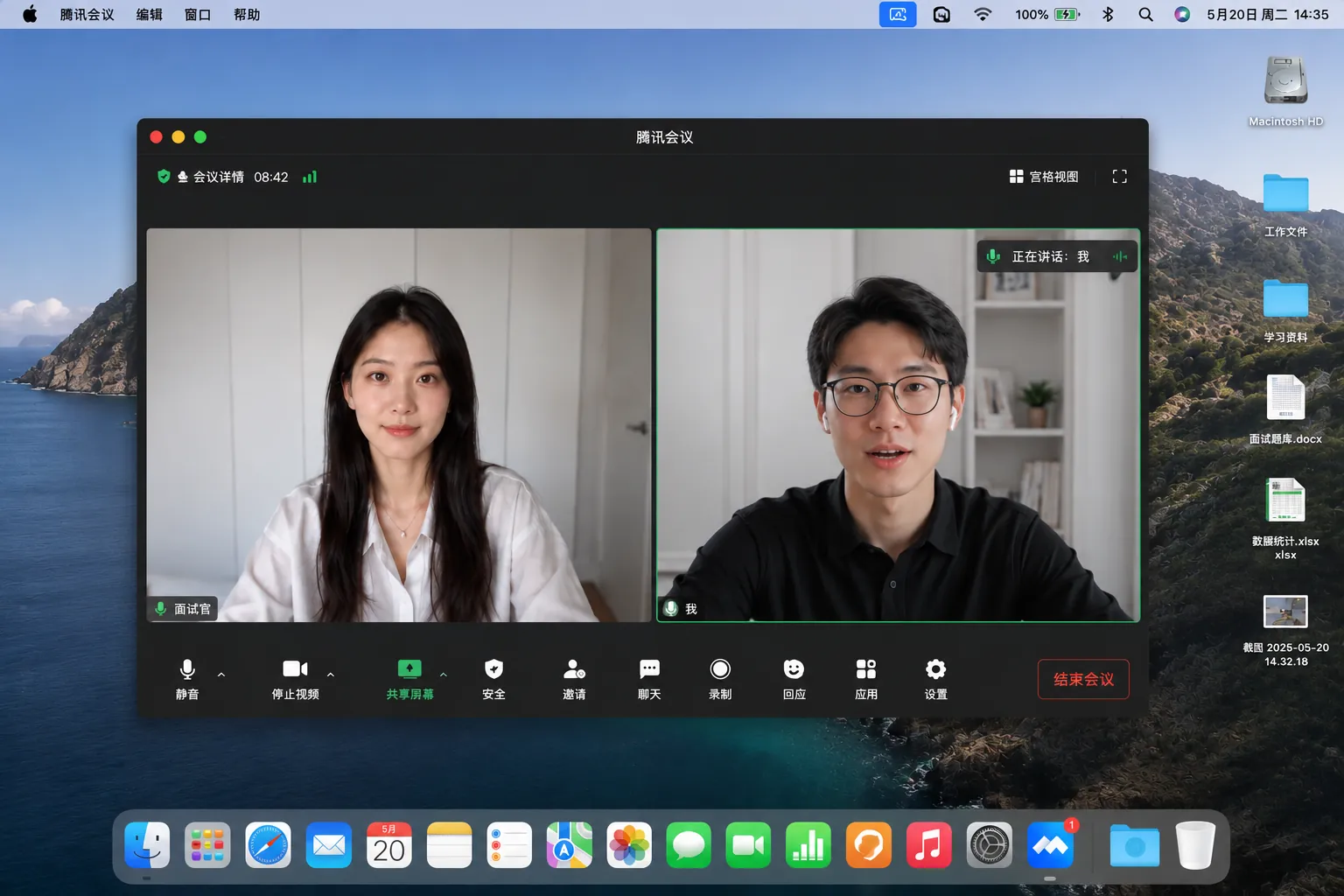
Interview video-call desktop
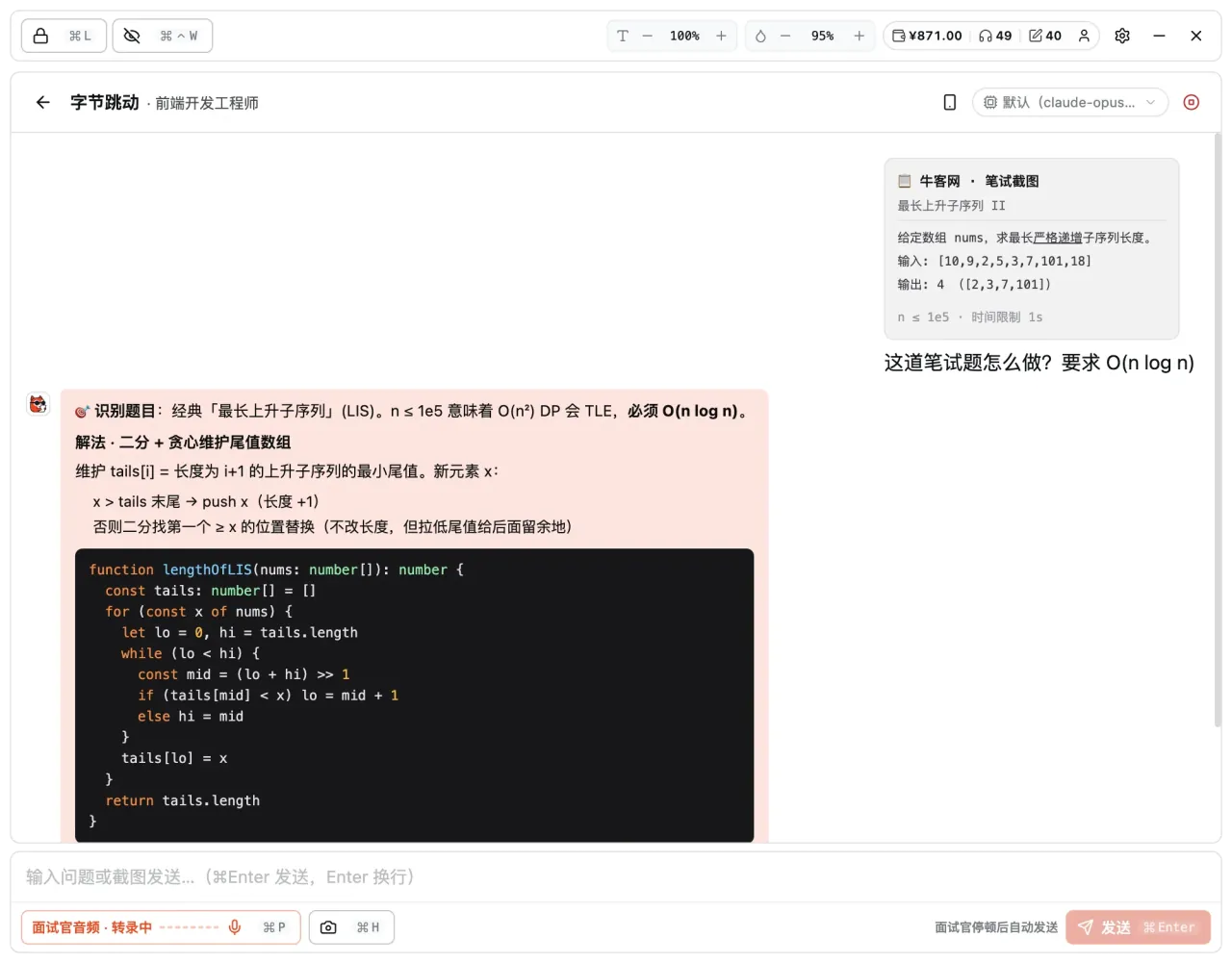
Coding-test copilot · reads the question + AI solution Stealth on
REC Visible to you Invisible to the interviewer
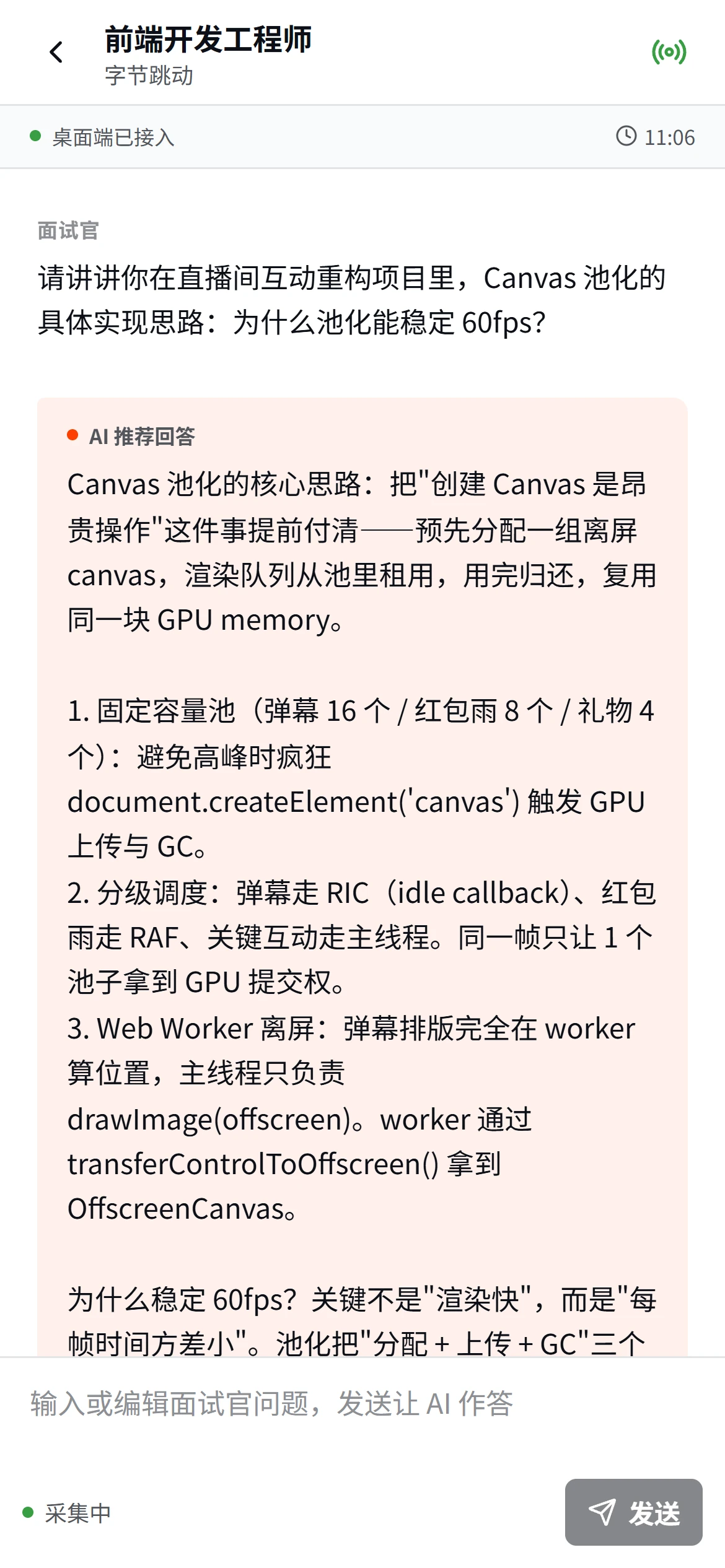
Phone second screen · live-synced AI answers

Fully invisible

The interviewer can't see Kuaimian

Drag the handle to see how the assist window stays invisible to recording and screen sharing

Works with every major meeting & coding-test platform

Tencent MeetingTencent Meeting
LarkLark
DingTalkDingTalk
WeChatWeChat
ZoomZoom
Microsoft TeamsMicrosoft Teams
Google MeetGoogle Meet
WebexWebex

WEB · Works right in your browser

Everyday prep—just open the web page and start.

Resume optimization and mock interviews require no app—sign in and go, with progress synced across devices.

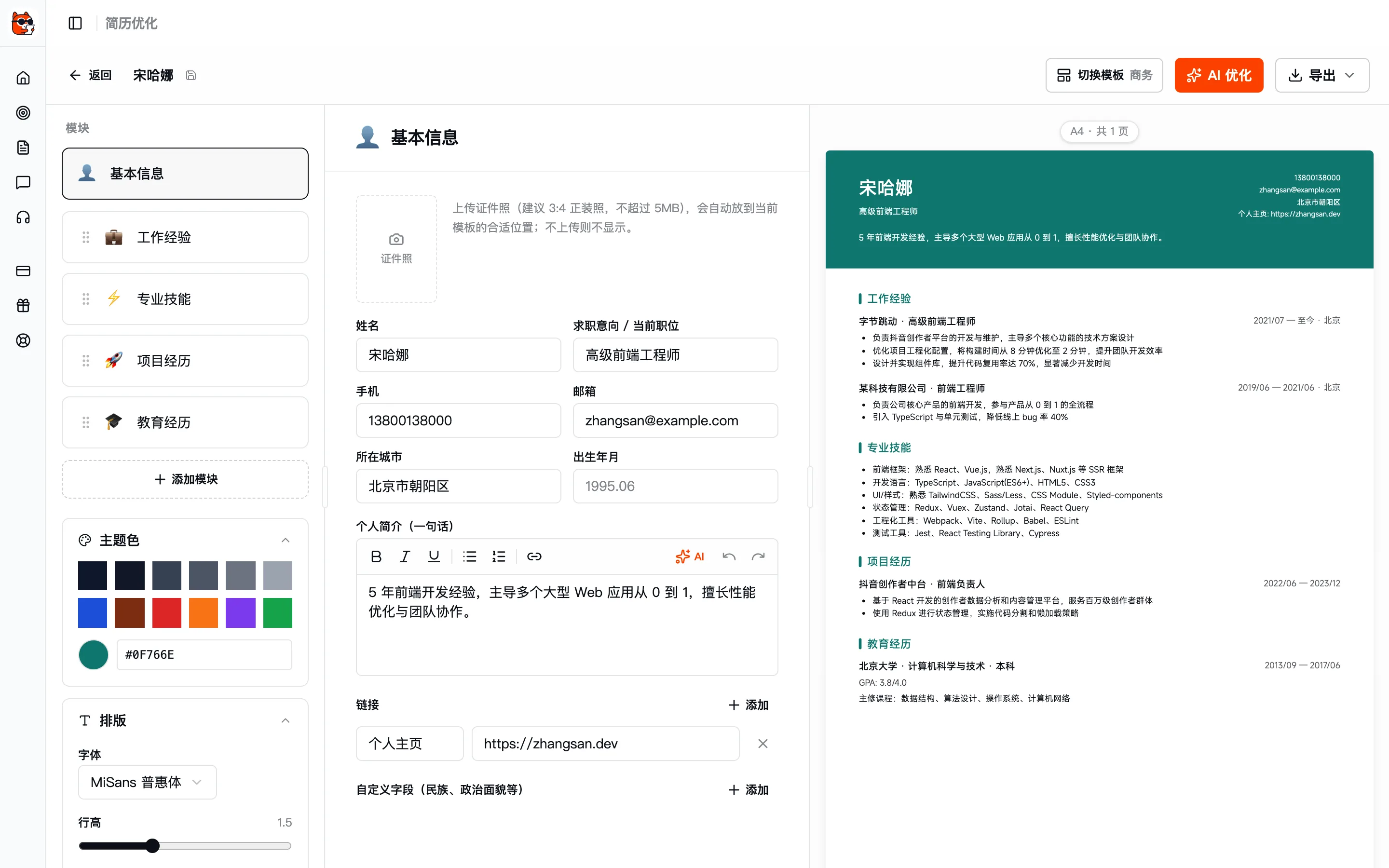
AI Resume

Write your resume around the target job description.

After you upload an old resume or fill in your experience, AI automatically adjusts the focus to your target job description, rewrites the wording, fills in quantified results, and offers section-by-section revision suggestions.

  • One-click JD tailoring: switch roles to shift the focus
  • Quantification tip: change "responsible for" to "increased X by N%"
  • Real-time quality scoring, with each item clickable to edit
View details
web.kuaimianai.com/app/resume
AI resume editor · three-pane layout + live preview
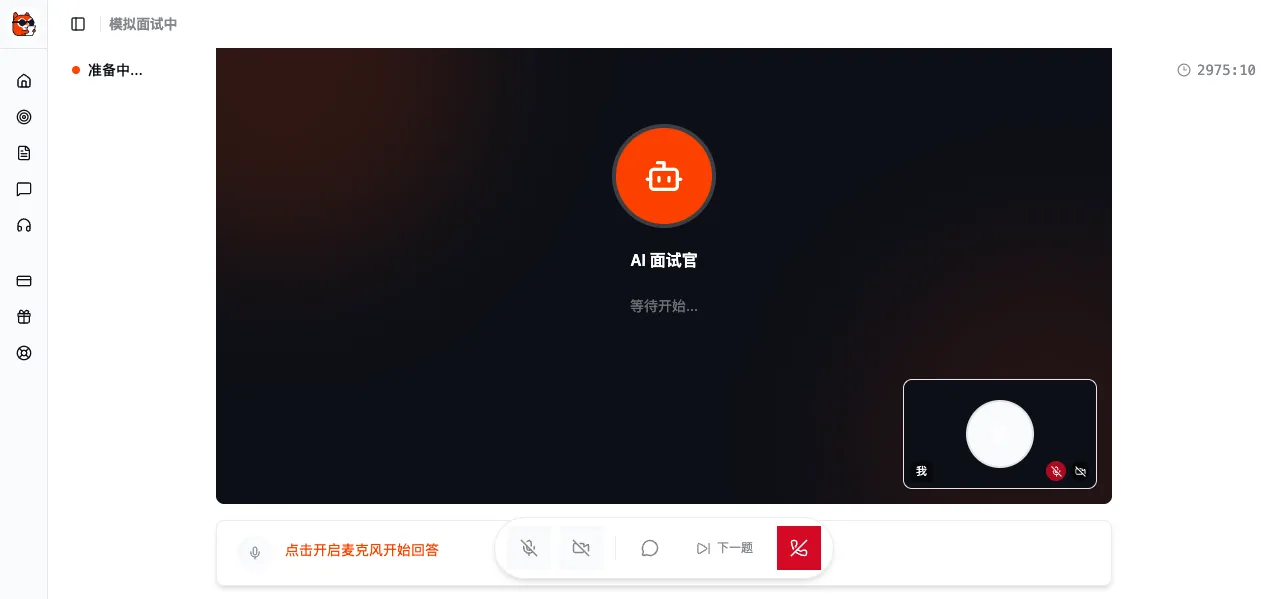
AI mock interview

Practice interviews through lifelike conversations with AI.

Once you pick a position, AI questions, follows up, and stress-tests you in an interviewer's voice; after each session it automatically generates a question-by-question review, improvement suggestions, and focus areas for next time.

  • Text / voice dual modes, at your own pace
  • Multi-round follow-ups that simulate real high-pressure interviews
  • Structured review: which questions you tackled head-on and which you dodged
View details
web.kuaimianai.com/app/mock-interview
AI mock interview · live conversation + chat history

DESKTOP · Real interview scenarios

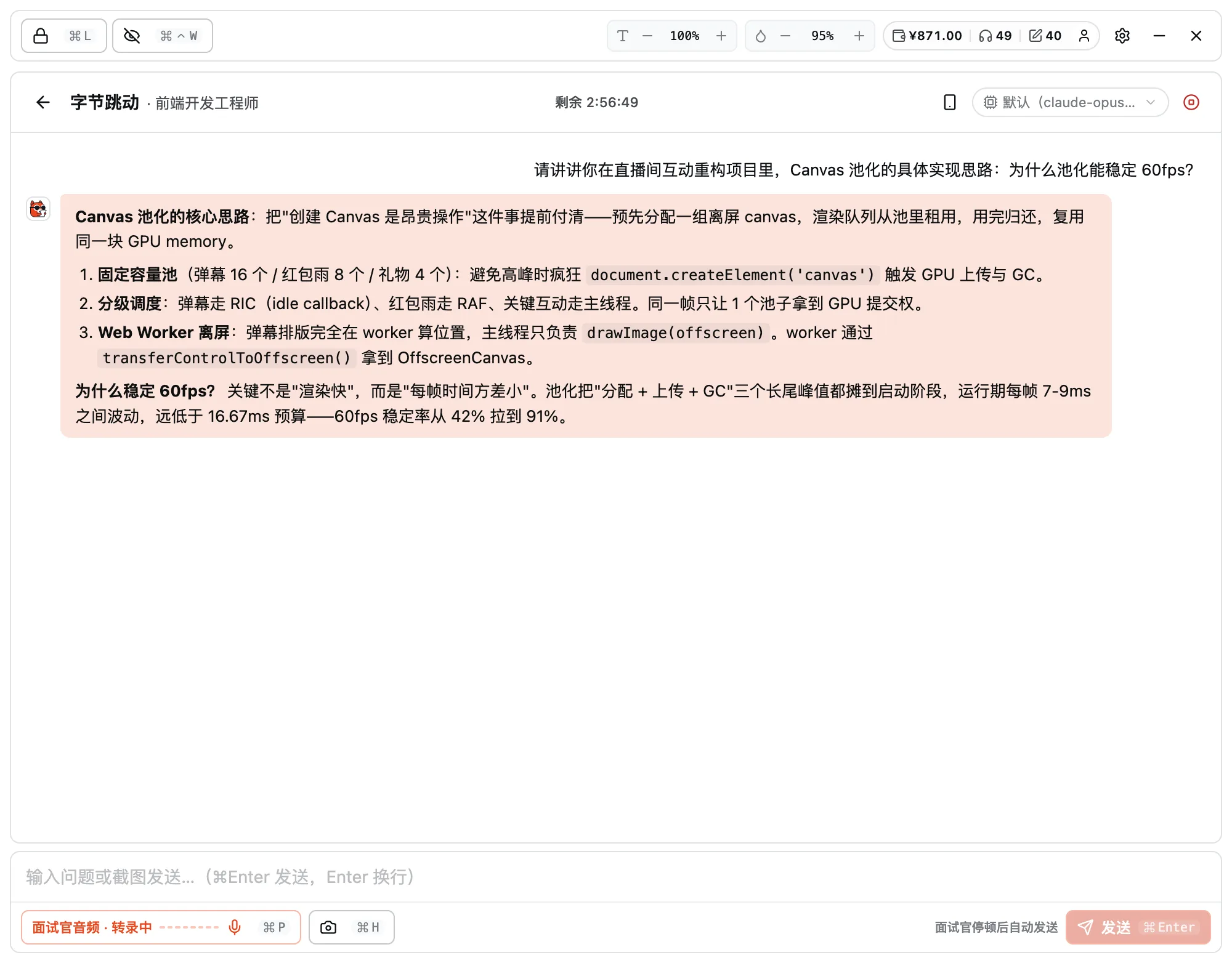
During the real interview, the desktop app sits right beside you.

Invisible to screen sharing + system audio capture + live screen reading — three desktop powers built for the interview itself.

interview copilot

Listens to questions in real time and gives answer ideas in seconds.

Keep the client running during a video interview: it captures the interviewer's questions, recognizes them locally, and hands you an approach, keywords, and an opening line. The window hugs the screen edge with adjustable opacity, and stays invisible to screen sharing and recording — even when you share your whole screen.

  • System audio capture (won't grab your interview software's microphone)
  • Invisible to screen sharing and recording (OS-level capture protection)
  • Answers built around your resume + job description context
Kuaimian
Interview assist · live question capture + AI answer outline
Coding-test assist

Online coding-test questions, with solution ideas in seconds.

Screenshot the current question, and AI automatically interprets it, outlines the solution steps, generates reference code in the relevant language, and annotates the complexity. Everything runs locally—the original question text is never sent externally.

  • Multiple languages: JS / TS / Python / Java / C++ / Go / Rust
  • Solution approach + code + complexity, side by side
  • Supports online platforms like Nowcoder / LeetCode / Codility
Kuaimian
Coding test assist · question recognition + solution code + complexity

Supports macOS 12+ · Windows 10/11 · Linux

MULTI-DEVICE · Connected across devices

Main screen on your computer, prompts on your phone.

Run the video call on your main screen and read AI prompts on your phone as a second screen — the prompts never enter any shared view, so the interviewer can't see them.

  • Desktop: full interview assistance

    System audio capture, screen recognition, edge-docked transparent window—this is the main arena.

  • Mobile: a "sideline prompter"

    Keep it within reach to see AI talking points + keywords—more natural than glancing at your computer screen.

  • Scan to pair—no need to sign in again

    Scan with your phone to auto-pair with the current computer session, and AI prompts push to it in sync.

Scan with your phone

Go to the mobile entry point, or download the mobile app directly.

Generating…
Interview assist · live question capture + AI answer outline Stealth on
Phone second screen · live-synced AI answers

Phone as second screen

Prompts stay off the shared screen

HIGHLIGHTS · Core advantages

Why Kuaimian

From response speed to stealth, models, and languages — each one directly shapes your live interview experience.

Works on every platform

Mainstream video meetings, online coding tests, on-site interviews — plug in via audio or screenshot.

ZoomZoomTeamsTeamsMeetMeetTencent MeetingTencent MeetingLarkLarkWebexWebexDingTalkDingTalkWeChatWeChatand every other meeting or interview platform

Millisecond answers

The moment they stop speaking, the answer points are already on your screen.

≈0.4sAvg. time to first token

Top-tier models, no surcharge

Switch to the strongest models freely — one flat price, no per-model surcharge.

¥0surcharge
Claude OpusGPT-5Gemini 2.5DeepSeek

Invisible to screen sharing

Screen-share-proof and recording-proof — neither the interviewer nor the recording can see the assist.

Interviewer / recording sees
Your screen sees
AI · visible only to you

Real-time multilingual interviews

Foreign firms and overseas roles — understand and answer foreign-language interviews too.

EN · Interviewer“Walk me through a tricky bug you fixed.”

AI · Your answer“Sure, we hit a race condition in the payment callback…”

中文English日本語한국어EspañolDeutsch

No time limit per interview

One flat price till the end — no per-minute billing, no mid-session drops.

  • per-minute billing
  • cut off at a time cap
  • Stays till the interview ends

PRICING · PAY AS YOU GO

Three packages, or pay as you go.

Packages bundle credits at a lower unit price and never expire. Or skip packages and top up your wallet — billed precisely per session / per question.

Free for now

Free Starter Pack

Auto-credited the moment you sign up, no payment needed — run the whole flow right away.

  • Interview assist × 1No time limit per session
  • Coding test × 5
  • Mock interview × 1

Starter Pack

Campus hiring season — get the full flow down first

¥29
¥40Save ¥11
  • Interview assist × 1No time limit per session
  • Coding test × 10
  • Mock interview × 4

Pro Pack

Popular

The go-to choice while applying and interviewing

¥69
¥110Save ¥41
  • Interview assist × 4No time limit per session
  • Coding test × 30
  • Mock interview × 8

Max Pack

Many targets, dense interviews — stock up once

¥129
¥215Save ¥86
  • Interview assist × 8No time limit per session
  • Coding test × 60
  • Mock interview × 15
Pay as you go interview copilot ¥10/ session Mock interview ¥5/ interview Coding test ¥1/ question

AI resume is free · balance and package credits never expire · Alipay / WeChat Pay supported · for bulk corporate purchases, Contact us

FAQ · Frequently asked questions

Take a quick look before you start.

Have other questions? Email us at hello@kuaimianai.com

What makes Kuaimian different from other AI interview tools?
Kuaimian turns interview prep from "grinding question banks" into "preparing around your target job description". Every feature (resume optimization, mock interviews, interview copilot) shares the same position context, so the output automatically matches the tone and evaluation criteria of your target company and role.
Can I use it without an existing resume?
Yes. Kuaimian lets you fill in your experience directly and structures it into a resume automatically; you can also upload an old resume (PDF / Word) for AI to parse and optimize.
Is the mock interview text or voice?
Both. You can type to practice phrasing or speak to practice verbal delivery — the pace is entirely up to you.
Will the interviewer notice the copilot?
The desktop app is a frameless transparent window with system-level capture protection for screen sharing and recording — even sharing your whole screen, Kuaimian never appears in the interviewer's view or recordings.
How does it recognize coding questions?
Just screenshot the current problem — the AI OCRs the statement and understands the inputs, outputs, and constraints, no manual transcription needed.
Will the interviewer notice the interview copilot?
The desktop app is a frameless transparent window with system-level capture protection for screen sharing and recording (native Windows / macOS capabilities) — even if you share your entire screen, Kuaimian never appears in the interviewer's view. System audio capture happens entirely on your machine; your microphone audio is never sent anywhere.
Can one resume produce multiple versions for different roles?
Yes. Start from one base draft and paste different job descriptions to derive tailored versions — applications to different companies stay independent.
Does the AI ask questions based on my resume and role?
Yes. Kuaimian designs the question line around the projects in your resume and your target job description, from behavioral to technical, and follows up on your answers.

Ready?
For your next interview, use Kuaimian

Start free: try resume optimization and mock interviews to get a feel for how the AI responds, then decide whether to top up on interview assistance.